Version: v1.0
System Overview
In this chapter, you will be presented with a detailed manual explaining how each main page in the system works as well as explaining all the main functionalities of the system.
Important information
Please be aware that some menu items that are shown in this part of the manual might not be available to you; this will directly depend on the rights that you have in the system.
General Principles
General navigation principles for all tables
Example of a table:
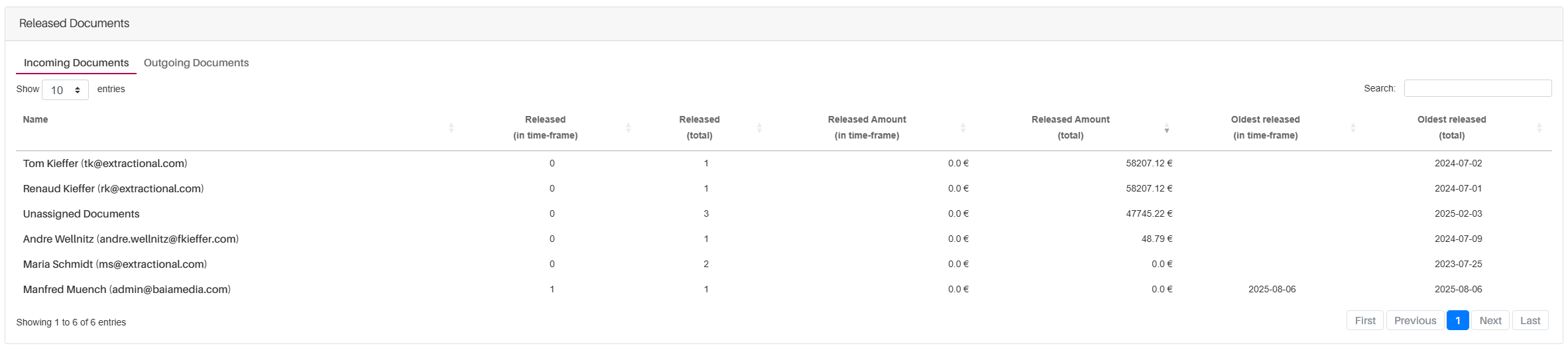
To enhance usability for all tables, several navigation features are available:
-
To switch between Incoming and Outgoing documents, use the tabs at the top of the table.
-
To sort table elements by a specific column, click on the column header. An icon will indicate the current sorting order (ascending or descending). Clicking repeatedly toggles between the sorting options or removes the sorting.
-
To search for a specific row, use the search bar in the top-right corner of the table. Searches are conducted based on the information visible in the table.
-
To adjust the number of rows displayed per page, click on the current items-per-page indicator at the top of the table and select your preferred amount.
-
To navigate between pages, use the pagination controls at the bottom of the table.